
What is Budget Planner?
Budget Planner is an extension of Fospha's daily measurement and forecasting. It answers one question: where should you move your budget for the best return, across your entire channel mix?
It measures what's happening, forecasts what could happen, and generates one plan built to find your optimal spend.
How it works
Budget Planner is built on four layers of modeling, each one building on the layer below it. The result isn't a single guess, it's a recommendation assembled step by step from your measurement data.
1. The core model
This is the foundation everything else stands on: your daily, full-funnel measurement of every channel. It's the same data underneath your Fospha dashboards, so Budget Planner isn't working from a separate or simplified view of your performance.
2. The forecast
Using that measurement, Budget Planner estimates how much incremental revenue and conversions each channel could drive at different spend levels. Rather than a single point estimate, it expresses this as 5,000 plausible scenarios, each one a different, statistically grounded version of how your channels could respond to spend. Mapping the full range up front is what makes a genuinely low-risk recommendation possible later on.
3. The optimizer
Budget Planner runs 500 of those scenarios through a complete budget optimization. Each one finds the best possible allocation across your channels for that particular scenario, turning a range of forecasts into a range of concrete plans to compare and rank.
4. The selector
Budget Planner ranks all 500 optimized outcomes from most optimistic to most conservative, and keeps only the 50 lowest-risk. These 50 are averaged into your one final recommendation.
Why the most conservative outcomes, not the best-looking ones
Every one of the 500 optimizations shows an improvement on your current performance, they just differ in how optimistic or conservative the assumptions behind each one are. Budget Planner builds your recommendation from the 50 most cautious of those outcomes, not the most optimistic. That's why it's a plan you can commit to, not a best-case scenario you're hoping plays out.
Guardrails across the whole mix
Alongside the four modeling layers, Budget Planner applies guardrails that cap how much any channel's spend can shift per cycle, and funnel weighting that stops retargeting from pulling budget away from awareness spend. These come from patterns Fospha has learned managing budget shifts across hundreds of enterprise customers, so the recommendation protects your whole mix, not just the channel with the best-looking number.
Because Budget Planner is built on Fospha's daily measurement, every plan reflects your most recent channel performance, not last quarter's numbers.
Creating a budget plan
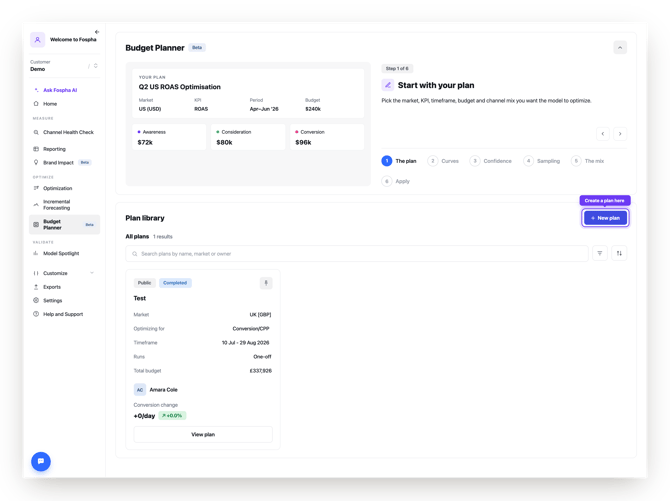
Step 1: Start a new plan
Go to Budget Planner in your navigation menu and select Create Plan.
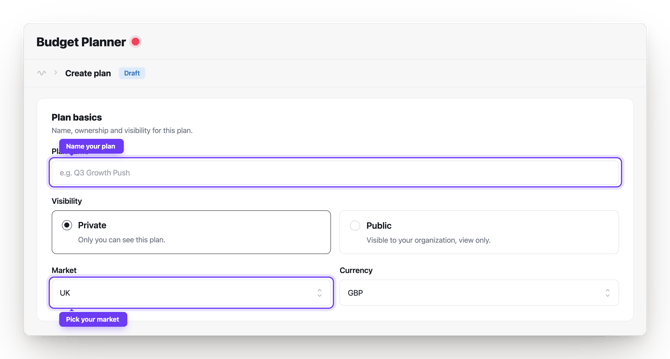
Step 2: Name your plan and select a market
Give your plan a name you'll recognize later, and choose the market you want to plan for.
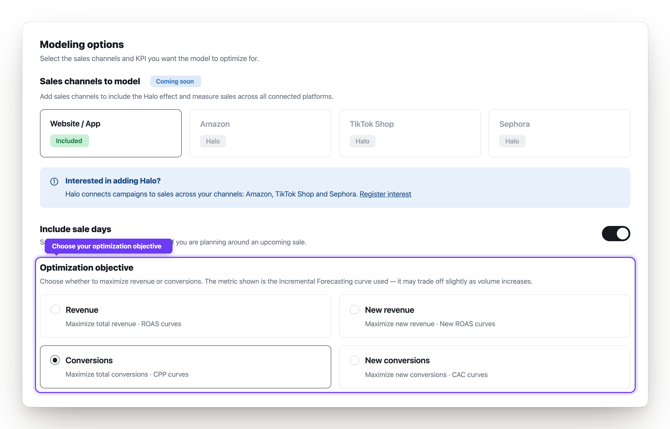
Step 3: Choose your KPI
Select the metric you want Budget Planner to optimize toward, such as ROAS.
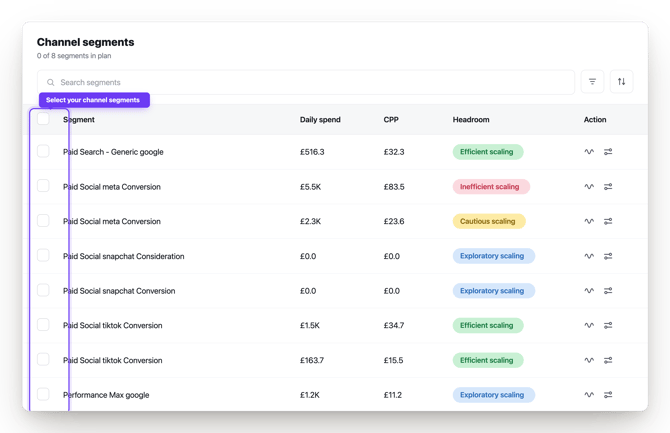
Step 4: Select your channels
Choose the channel segments you want included in this plan.
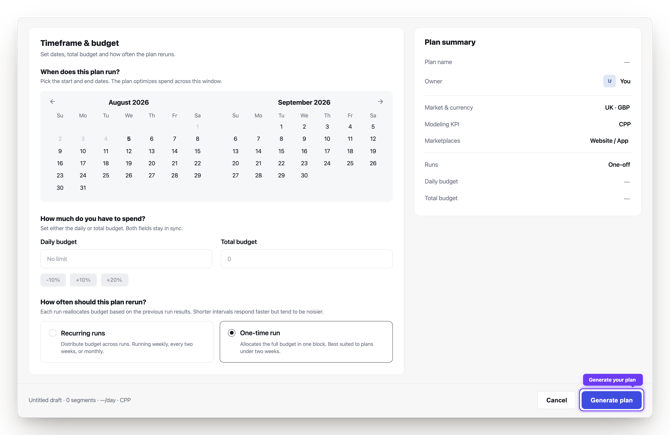
Step 5: Set your budget and timeframe
Use your current spend as the basis for the plan, or enter a new total budget if you want to model a higher or lower spend level.
.png?width=670&height=487&name=fospha-timeframe-budget%20(1).png)
Step 6: Run the optimization
Select Run to generate your plan.
Step 7: Review your results
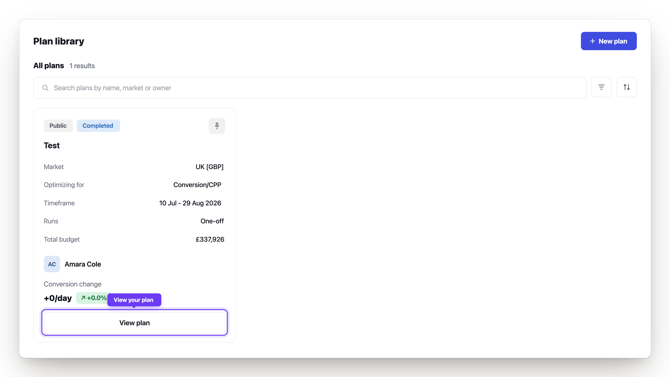
Your results table shows, for each channel:
- Current vs. recommended spend
- Absolute and percentage change
- Predicted impact on your chosen KPI
Tips
- Treat it as a starting point. Bring context the model can't see, like contractual minimums or upcoming campaigns.
- Revisit it regularly. Because it's built on daily data, a plan you ran last month may look different today.
- Start with channels that have strong Incremental Forecasting data. The more reliable that data, the more confidence you can have in the recommendation.
- Try more than one budget level. If you're deciding whether to scale up, run a plan at your current spend and another at a higher level to compare where the extra budget would work hardest.
Troubleshooting
I don't see Budget Planner in my navigation menu.
Budget Planner is in Beta and being rolled out gradually. Contact your account manager to check your access.
My recommended spend changes look too large.
Budget Planner applies guardrails to prevent unrealistic swings in any one channel. If a recommendation still looks off, flag it to your account manager.
A channel I expected to see isn't included.
Only channels with sufficient Incremental Forecasting data are available to select. Contact your account manager to check your channel's data status.
FAQ
Do I have to keep my current budget, or can I plan for a different spend level?
You can do either. Use your current spend as the starting point, or enter a new total budget to see how Budget Planner would allocate a higher or lower amount across your mix.
How is this different from a scenario planner?
A scenario planner gives you a set of what-ifs to interpret yourself. Budget Planner samples 5,000 scenarios, simulates 500 in full, and narrows them to the 50 lowest-risk outcomes, then gives you one recommendation.
Why does Budget Planner pick the most conservative outcome instead of the best one?
Every one of the 500 tested optimizations shows an improvement on your current performance, they just vary in how optimistic the assumptions behind each are. Budget Planner averages the 50 lowest-risk of those into your recommendation, so it's built to hold up even if conditions aren't ideal, not just in the best case.
What stops Budget Planner from over-correcting into one channel?
Built-in guardrails cap how much any channel's spend can shift per cycle, and funnel weighting protects awareness spend from being reduced in favor of retargeting.
Can I plan for more than one market at once?
Each plan covers a single market. Create a separate plan for each market you want to review.
What data does Budget Planner use to build a plan?
It's built on your Incremental Forecasting data, which itself sits on Fospha's daily, full-funnel measurement. Channels without enough Incremental Forecasting history won't be available to select.
Does Budget Planner make changes to my ad platforms automatically?
No. It gives you a recommendation to review and action yourself, it doesn't push changes to your ad accounts.
How often should I create a new plan?
There's no fixed schedule, but since Budget Planner is built on your daily measurement data, it's worth checking back regularly rather than treating one plan as permanent.