
This article explains what the Sales Platform filter is, how it works across your Fospha dashboards, and what to keep in mind when interpreting filtered views.
What it is
If your brand sells across more than one platform — Web / App, Amazon, or TikTok Shop — the Sales Platform filter lets you isolate performance by sales destination across all your core Fospha dashboards.
Select one or more platforms and every metric updates together: conversions, revenue, ROAS, and all charts.
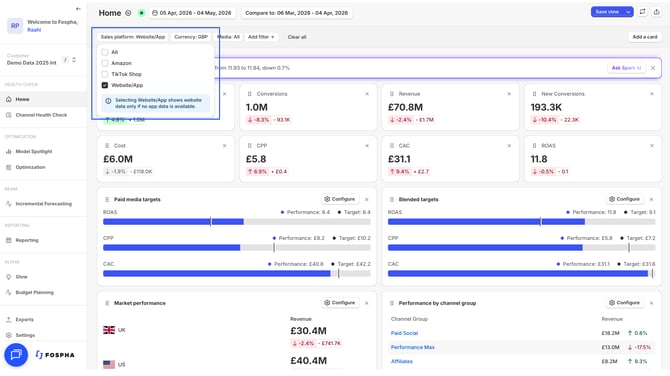
Web-only brands: The filter is not shown for single-platform accounts. If you don't see it, your account is configured as Web / App only.
What questions it answers
The Sales Platform filter is designed for different teams and use cases. Here's what it makes possible:
You want to understand performance by platform, not just in aggregate. Multi-platform brands often need to present performance separately by sales destination - to their own teams, to finance, or to leadership. The filter gives you a clean, platform-specific view of Web / App, Amazon, and TikTok Shop without switching between separate reports.
You want to present a platform-specific ROAS view to your team. If you're running TikTok Shop campaigns, filtering to TikTok Shop isolates that performance in full - spend, revenue, and ROAS — without Amazon or DTC data mixed in.
You want to understand how your DTC media is contributing to just Amazon or TikTok Shop revenue. The filter doesn't just show platform-native activity. Because Fospha measures cross-platform Halo effects, filtering to Amazon shows you the Amazon revenue your Meta, Google, and TikTok campaigns drove - not just what Amazon Ads generated on its own.
You want to distinguish GMV Max from standard TikTok spend. GMV Max appears as its own distinct source - tiktok gmv max - in the Source filter, separate from standard TikTok ad spend. GMV Max spend is assigned to the TikTok Shop sales platform. Revenue attributed to GMV Max can appear across all sales platforms, because a GMV Max impression may drive a purchase on TikTok Shop, your website, or Amazon.
Where it appears
The Sales Platform filter sits at the front of the filter bar and is available across:
- Home
- Channel Health Check
- Optimization
- Reporting
How to use it
Select one or more platforms from the filter. Metrics and charts update to reflect only the selected platform(s). The filter composes with all existing filters — date range, channel, market -- using AND logic.
A persistent indicator shows which platforms are currently selected, so there's no risk of misreading a filtered view as your full blended picture.
Filter options:
- Web / App — Web and App are combined as a single option. If your account has app data, you'll see combined Web + App performance. If you have website data only, a label confirms this in the dashboard.
- Amazon — Shows performance including Amazon revenue attributed to your DTC media. See Halo Measurement: Amazon for more information on what it is and why it matters.
- TikTok Shop — Shows performance including TikTok Shop revenue attributed to your GMV Max campaigns. Find out more about TikTok Shop in this article.
How spend is assigned
Spend is assigned to a sales platform based on how marketing teams are typically structured — each ad channel is locked to the platform it primarily operates within:
| Channel | Sales platform |
|---|---|
| Amazon Ads, Amazon DSP | Amazon |
| GMV Max | TikTok Shop |
| Meta, Google, TikTok Ads, Snapchat, Pinterest, and all other channels | Web / App |
When you filter to Amazon, you see Amazon Ads and DSP spend alongside Amazon revenue. When you filter to Web / App, you see your Meta, Google, and other channel spend alongside Web / App revenue.
Revenue works differently. A Meta campaign that drives a purchase on Amazon will show that revenue under Amazon - this is the Halo effect. Spend and revenue are intentionally on separate axes, giving you the flexibility to see cross-platform revenue impact without forcing spend into buckets it doesn't belong in.
What changes in each dashboard
Channel Health Check This is where the Sales Platform filter has the most immediate impact. Filtering to Amazon or TikTok Shop reveals how your full media investment — including DTC channels — is driving revenue on those platforms. Platform-locked channels behave correctly: Amazon Ads rows disappear when filtering to Web / App only; TikTok Shop rows disappear when filtering to Amazon only.
Home All headline KPIs update to reflect the selected platform(s). Use this to get a top-line read on performance by sales destination.
Optimization Spend recommendations and efficiency signals update to reflect the selected platform view.
Reporting Use the Sales Platform filter alongside channel and date filters for trend analysis by sales destination over time.
Current limitations
- Web and App as separate filter options — Web and App are combined as a single "Web / App" option. Separate filtering is planned for a future release.
- Beam, Scheduled Exports, Saved Views, and API exports — the Sales Platform filter is not yet available in these areas.
- CAC and New Customer metrics — not available when Amazon data is included. These return when viewing Web / App only.
- Campaign objective filtering — not available for Amazon channels.
FAQs
What is GMV Max and how does it appear in the filter?
GMV Max is TikTok's performance-based campaign type for TikTok Shop. It appears as its own distinct source — tiktok gmv max — in the Source filter, separate from standard TikTok ad spend. GMV Max spend is assigned to the TikTok Shop sales platform. Revenue attributed to GMV Max, however, can appear across all sales platforms - reflecting the fact that a GMV Max ad exposure may drive a purchase on TikTok Shop, DTC, or Amazon.
If I filter to Amazon, does that only show me what Amazon Ads generated? No - and this is the most important thing to understand about the filter. When you filter to Amazon, you see all revenue completed on Amazon, including sales your Meta, Google, TikTok, and other DTC channels drove there. Fospha measures this cross-platform Halo effect, so Amazon Ads spend and DTC-driven Amazon revenue appear together in a single view. This is what makes it possible to see Amazon's true contribution to your business - not just what Amazon's own platform reports.
My ROAS looks different depending on which platform I filter to. Which number should I trust? All of them - they're answering different questions. The All view gives you your blended Total Commerce ROAS across every sales destination. A single-platform view shows what that platform is returning, including any Halo revenue attributed to it. Neither is more correct than the other; they serve different purposes. Use All for cross-channel budget decisions, and single-platform views when you need to present or report on a specific sales destination.
Why does my Web / App ROAS drop when I switch away from the All view? When you filter to Web / App, revenue is scoped to purchases completed on your website or app only. Any revenue your DTC channels drove on Amazon or TikTok Shop is excluded. This doesn't mean those channels are underperforming — it means you're looking at one slice of their total contribution. Switch to All to see the full picture.
Does filtering by sales platform affect my spend figures? Yes. Spend is assigned per platform based on channel — Amazon Ads and DSP spend appears under Amazon, GMV Max spend appears under TikTok Shop, and all other channels appear under Web / App. When you filter to a single platform, you see that platform's spend against its attributed revenue. A tooltip in the dashboard explains this assignment for any filtered view.
Can I select more than one platform at a time? Yes. The filter is multi-select — you can combine Web / App and Amazon, or any other combination, and metrics will reflect the selected platforms together. Use the persistent indicator at the top of the dashboard to confirm which platforms are active at any time.
I'm a web-only brand. Does this release change anything for me? No. The Sales Platform filter only appears for brands selling on more than one platform. If your account is Web / App only, your dashboard experience is unchanged.
Where can I use the Sales Platform filter? The filter is available across Home, Channel Health Check, Optimization, and Reporting. It is not currently available in Beam, Scheduled Exports, Saved Views, or API exports - these are planned for a future release.
Why can't I see CAC or New Customer metrics when I filter to Amazon? Amazon does not provide the transaction-level customer data needed to calculate these metrics accurately. They are available when viewing Web / App only. If these metrics are important to your reporting, your CSM can advise on the best approach for your account.