
Overview
This article covers where to find GMV Max Halo data in Fospha, what each dashboard view shows, and what decisions each one is designed to support.
GMV Max Halo data surfaces across four dashboards and each one supports a different layer of decision-making:
| Dashboard | Primary use |
|---|---|
| Home Dashboard | Get a channel-level view of performance across channels and sales destinations |
| Channel Health Check | Compare GMV Max Total ROAS against other paid channels on a consistent methodology |
| Optimization Dashboard | Identify the highest-impact GMV Max campaigns and prioritise spend |
| Incremental Forecasting (Beam) | Plan where to scale using forward-looking forecasts and incremental headroom |
The natural workflow moves from Validate → Compare → Optimize → Scale.
Home Dashboard
What it shows
The Home Dashboard gives you a channel-level view of TikTok's contribution to overall performance, including a plain-language summary from Spark AI Insights that explains what's driving any ROAS movement in the current period that you’ve selected.
How to use it
- Navigate to Home in the left-hand navigation.
- In the filter bar at the top, set Source to TikTok. This scopes the entire dashboard — including Spark AI Insights — to TikTok only.
- Locate the Spark AI Insights banner and select "Find out why" to open the insights panel.
- Review the channel-level breakdown.
How to interpret the results
- The Spark AI Insights breaks down how TikTok's individual channel-objectives (e.g. TikTok Prospecting Conversion or GMV Max) contributed positively or negatively to overall ROAS.
- The breakdown distinguishes between shifts driven by efficiency changes and those driven by changes in spend mix.
Key questions it answers
- How is TikTok contributing to overall ROAS this period?
- Is TikTok pulling performance up or down, and why?
What to do next
Use the Home Dashboard as your spring-board. If TikTok performance has shifted, move to Channel Health Check for a cross-channel comparison, or the Optimization Dashboard to investigate at campaign level.
Channel Health Check
What it shows
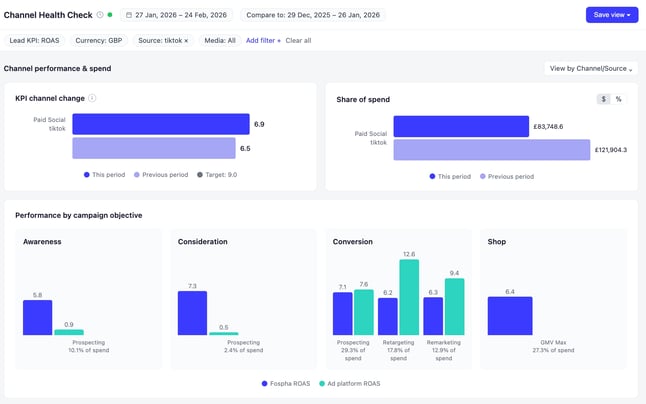
The Channel Health Check displays GMV Max Total ROAS alongside your other paid channels - Meta, Google, and TikTok Ads - calculated on the same order-based, net revenue methodology. This is the consistent view that allows like-for-like comparison across all your entire channel mix.
How Amazon is accounted for:
- Amazon excluded → GMV Max Halo reflects impact across Web + TikTok Shop only
- Amazon included → GMV Max Halo reflects impact across Web + TikTok Shop + Amazon
How to interpret the results
- Total ROAS is the primary metric. It credits GMV Max with revenue generated across all platforms where it drove conversions - not just TikTok Shop.
- A higher Total ROAS than TikTok Ads Manager's in-platform figure is expected. GMV Max's in-platform reporting uses gross revenue and product-level credit; Total ROAS uses net revenue and order-based counting, consistent with how Meta and Google are measured.
- Week-on-week or month-on-month trends in Total ROAS indicate whether GMV Max investment is holding efficiency as spend changes.
Key questions it answers
- How does GMV Max ROAS compare to Meta and Google on the same methodology?
- Is GMV Max Total ROAS holding, improving, or declining as spend scales?
- What share of attributed GMV Max revenue is coming from outside TikTok Shop?
Use cases
Make the business case for GMV Max investment When leadership is questioning GMV Max budget because TikTok Ads Manager ROAS looks lower than other channels, use Channel Health Check to compare GMV Max Total ROAS against Meta and Google. The like-for-like view shows GMV Max's contribution to your full business, not just TikTok Shop.
Track GMV Max efficiency over time Use the trend view to monitor Total ROAS week-on-week, month-on-month, and year-on-year. If Total ROAS is declining as spend increases, that's an early signal of approaching saturation. Move to Incremental Forecasting before your next budget decision.
Identify GMV Max's true contribution to blended revenue Use the Halo breakdown to see what share of attributed GMV Max revenue is coming from outside TikTok Shop. A significant Halo contribution means your GMV Max campaigns are driving discovery that converts on your website and Amazon — activity that would otherwise appear as organic, direct, or unattributed revenue elsewhere.
What to do next
- If Total ROAS is strong and trending upward: move to Beam to understand how much headroom remains before scaling further.
- If Total ROAS is declining: check the Optimization Dashboard for campaign-level performance to identify where efficiency is dropping.
- If Halo contribution is significant: flag this in finance conversations and use it to support continued GMV Max investment.
-png.png?width=647&height=270&name=image%20(1)-png.png)
Optimization Dashboard
What it shows
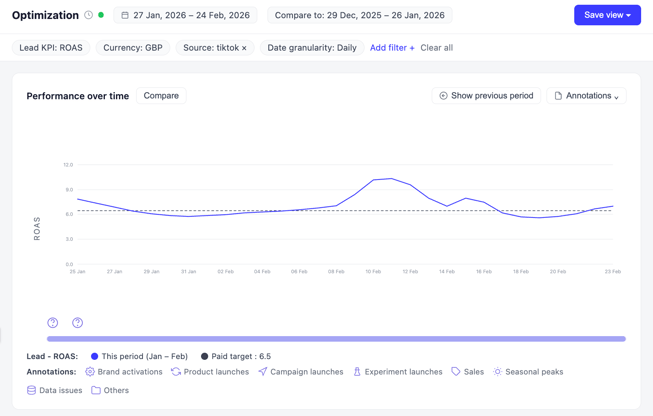
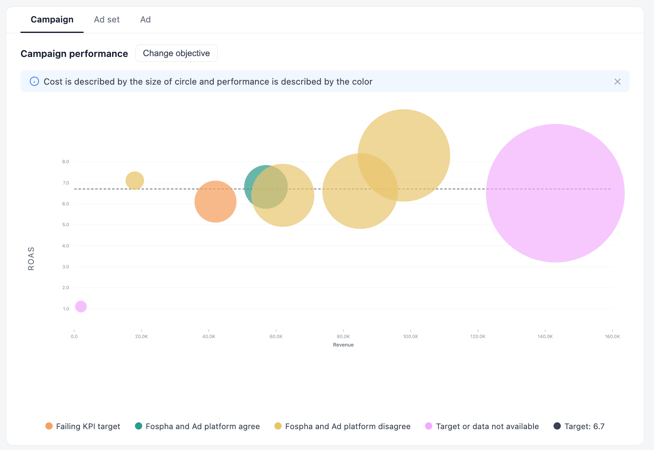
The Optimization Dashboard breaks Total ROAS down to individual GMV Max campaign level. It shows which campaigns are driving cross-platform impact — across web and Amazon as well as TikTok Shop — and which are contributing the most to Halo revenue.
How to interpret the results
- Campaign-level Total ROAS includes revenue from web and Amazon attributed to GMV Max exposure, not just TikTok Shop conversions.
- A campaign with low in-platform ROAS but high Total ROAS is generating demand that converts outside TikTok's ecosystem. These are typically the campaigns to protect.
- A declining Total ROAS trend at campaign level, particularly as spend increases, is an early indicator of saturation at the campaign level. Check Beam before adjusting budget.
Key questions it answers
- Which GMV Max campaigns are driving the strongest cross-platform returns?
- Are there campaigns that look underperforming in TikTok Ads Manager but are actually contributing significant Halo revenue?
- Is campaign efficiency holding, improving, or declining as spend changes?
Use cases
Prioritise budget toward your highest-impact campaigns Before pausing a GMV Max campaign based on TikTok's platform reporting, check its Total ROAS in the Optimization Dashboard. If it's strong, the campaign is generating demand that converts on web and Amazon. These are the campaigns to allocate toward, not cut.
Track campaign efficiency over time Use the performance over time view to monitor Total ROAS week-on-week, month-on-month, and year-on-year at campaign level. A declining trend as spend increases signals saturation — your next step is to check Incremental Forecasting before the next budget decision.
What to do next
- Campaigns with high Total ROAS and available headroom: escalate budget and confirm headroom in Beam.
- Campaigns with declining Total ROAS as spend increases: hold spend and check the saturation curve in Beam.
Beam’s Incremental Forecasting
What it shows
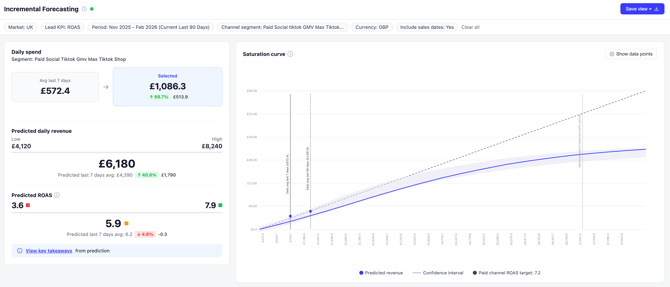
The Incremental Forecasting view models how much more you can invest in GMV Max before reaching diminishing returns. The headroom calculation accounts for both TikTok Shop and Halo effects - so it reflects GMV Max's full revenue footprint, not just its TikTok Shop contribution.
Because Halo extends the total revenue attributed to GMV Max, brands measuring Core only typically underestimate their available headroom. Beam allows you to start making budget decisions from a complete revenue picture.
How to interpret the results
- The saturation curve shows your current spend position relative to the point of diminishing returns.
- If the curve is still rising steeply at your current spend level, there is meaningful headroom — additional investment should generate incremental returns.
- If the curve has begun to flatten, you are approaching saturation. Additional spend will generate lower incremental returns per pound/dollar invested.
Key questions it answers
- How much more can I invest in GMV Max before hitting diminishing returns?
- What will the expected return be if I increase GMV Max budget by X%?
- Should I scale spend, hold, or redirect budget elsewhere?
Use cases
Build the case to scale GMV Max ahead of a peak period Before a major trading window — Black Friday, Prime Day, a key campaign period — pull up the GMV Max saturation curve in Beam. If there is meaningful headroom, you have data to support a budget increase. If the curve is already flattening, optimising within existing campaigns will generate better returns than increasing spend.
Avoid over-investing in a saturated channel If GMV Max spend has been increasing but blended performance feels like it's plateauing, check the Incremental Forecasting curve. A flattened curve at your current spend level signals that additional investment will generate diminishing returns. Use this to redirect budget to channels with stronger headroom, or to optimise creative and audience strategy within existing GMV Max campaigns.
Forecast the revenue impact of a proposed budget change Use the scenario planner to model projected Total ROAS and total attributed revenue at a proposed new spend level. The forecast accounts for Halo effects and reflects incremental revenue across TikTok Shop, web, and Amazon.
What to do next
- Headroom available: take the output to your next budget conversation as supporting data for a spend increase.
- Curve is flattening: hold current GMV Max spend and redirect incremental budget to channels with stronger headroom. Review campaign-level performance in the Optimization Dashboard to look for efficiency gains within existing spend.
- Finance wants a revenue forecast for a proposed budget change: use the scenario planner output directly. It provides total attributed revenue and Total ROAS at the proposed spend level.
Why GMV Max doesn't appear in Attribution Comparison
You won't see a Last Click or Ad Platform comparison for GMV Max in Fospha's Attribution Comparison. There are three reasons for this:
- Different reporting definitions — TikTok's GMV Max reporting uses SKU-level counting and gross revenue. This can't be compared like-for-like with other channels on a last-click basis.
- Separate API with different attribution logic — GMV Max performance data is accessed through a different API, making direct attribution comparison unreliable.
- To avoid misleading comparisons — Fospha surfaces its modelled view of GMV Max in attribution comparisons only, rather than present a figure that appears equivalent to other channels but is calculated differently.
If you want to reference TikTok's own figures alongside your Fospha data, use TikTok Ads Manager separately. For all internal budget and channel decisions, use Total ROAS as your primary metric.
Use cases for Fospha vs TikTok Ads Manager
| Use Fospha for… | Use TikTok Ads Manager for… |
|---|---|
| Understanding the true cross-platform ROI of your GMV Max investment | Day-to-day campaign management and in-platform optimisation |
| Comparing GMV Max to Meta, Google, and other channels on a like-for-like basis | Monitoring TikTok Shop conversion rates, ad spend pacing, and creative performance |
| Informing budget allocation decisions across your full channel mix | Real-time audience and reach data within TikTok's ecosystem |
| Justifying GMV Max investment to finance or senior stakeholders | A/B testing creative formats and audience targeting within the platform |
| Understanding how GMV Max interacts with other channels — including search and Amazon | Product-level reporting and TikTok Shop seller analytics |
| Forecasting how much additional GMV Max spend will generate incremental revenue before you commit budget | Hourly performance monitoring during live campaigns or promotional events |
Key Takeaways
- Four dashboards, one workflow. Home Dashboard gives you a channel-level performance overview. Channel Health Check validates and compares Total ROAS. Optimization Dashboard prioritises at campaign level. Beam forecasts headroom and models budget scenarios.
- Total ROAS is the metric to use. It accounts for TikTok Shop, web, and Amazon revenue on the same order-based, net revenue methodology as your other paid channels - making it directly comparable across your channel mix.
- Campaign-level Halo data protects good campaigns. A campaign that looks underperforming in TikTok Ads Manager may be driving significant incremental revenue on DTC and Amazon. Check Total ROAS before pausing.
- Beam headroom is calculated on the full revenue picture. Brands measuring GMV Max Core only typically underestimate available headroom because Halo revenue isn't included. Use Halo-informed headroom figures for all scaling decisions.